
Google is giving Android an unusually practical AI feature: the ability to remember where you physically left something.
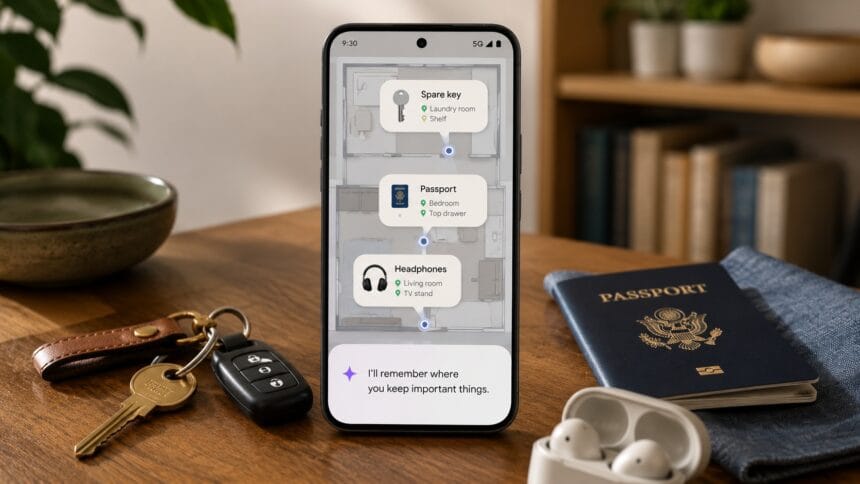
As part of its September Android Drop, Google is integrating Gemini with Find Hub so users can tell their phone where they’ve stored objects that don’t have Bluetooth trackers attached.
Put your passport in a drawer?
Tell Gemini.
Hide a spare key somewhere you’ll inevitably forget six months later?
Tell Gemini that too.
The information is saved inside Find Hub, where it can later be retrieved either by asking Gemini or opening a new remembered-items section. Users can optionally attach a photo of the object’s location as well.
It’s a small feature compared with the giant AI-model announcements dominating the technology industry.
But it may also be a much better demonstration of what useful consumer AI actually looks like.
Instead of asking users to invent reasons to talk to a chatbot, Google is making AI quietly solve an everyday problem.
Find Hub is becoming more than a tracker network
Google’s Find Hub already helps Android users locate phones, compatible trackers and other connected devices.
The new Gemini integration extends that concept to objects containing no tracking hardware at all.
The difference is simple.
A Bluetooth tracker can tell you where something currently is.
Gemini can now remember where you told it you put something.
For example, Google suggests telling Gemini:
“Remember in Find Hub that I put my passport in my bedroom drawer.”
Find Hub stores the location description, and the user can add an image for additional context.
Months later, instead of searching every drawer in the house, the user can ask Gemini where the passport was stored.
The answer comes from the memory previously saved in Find Hub.
Obviously, Gemini isn’t secretly tracking the passport.
If someone moves it afterward, Android won’t magically know.
But for rarely used objects that tend to disappear into “somewhere safe,” that distinction may not matter much.
It solves a problem trackers can’t
Bluetooth trackers such as AirTags and Find Hub-compatible tags work extremely well for objects that move frequently.
Keys.
Bags.
Luggage.
Wallets.
But attaching a tracker to every physical object isn’t realistic.
People don’t normally put trackers on birth certificates, spare cables, passports, warranty documents, backup keys or the box containing some tiny adapter they’ll suddenly need two years from now.
These are objects people usually store deliberately and then forget.
That’s exactly where Google’s approach makes sense.
Rather than locating an object electronically, Android stores a human memory externally.
The clever part isn’t that Gemini can find your passport. It’s that Android can remember something you don’t want to remember yourself.
The feature will work on Android 16 and newer in countries where both Gemini and Find Hub are supported.
Google describes it as coming soon rather than immediately available everywhere, so availability will vary by device and region.
Android is also getting its own motion-sickness feature
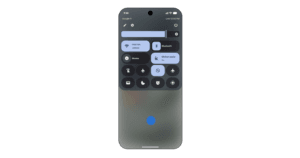
The same update introduces Motion Assist, designed for people who feel sick while looking at their phones in moving vehicles.
Motion sickness can occur when the visual information reaching the brain conflicts with what the body’s balance system senses.
You’re looking at a stationary screen.
Your body, meanwhile, knows you’re accelerating, turning and braking inside a car.
Motion Assist tries to reduce that mismatch by placing animated bubbles over the display that react to the vehicle’s movement.
Users can configure the feature to activate automatically and can adjust the bubbles’ shape, color and opacity.
It can also be placed in Android’s Quick Settings for easier access.
If the idea sounds familiar, that’s because it is.
Apple introduced Vehicle Motion Cues for iPhone and iPad in 2024, using animated dots around the display for essentially the same purpose.
Google’s version therefore isn’t a completely new idea.
But bringing it to Android makes the feature available across another enormous mobile ecosystem.
Motion Assist requires Android 17.
Guided Vision uses Gemini to help users understand their surroundings
Another addition is considerably more ambitious.
Google is introducing Guided Vision, an accessibility feature developed with blind and low-vision users in mind.
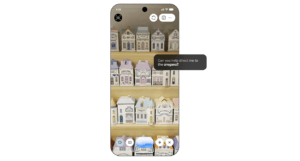
It combines a phone’s camera with Gemini Live to provide spoken assistance about objects and text in the surrounding environment.
A user could point the camera toward a food package and ask Gemini to read small print.
They could use it to understand a menu in a dimly lit restaurant.
Or they could ask the phone to help identify a particular object in a cupboard.
The important part is that Guided Vision doesn’t simply analyze whatever happens to appear in the camera.
It can also help the user aim the camera correctly.
If the object isn’t properly framed, the system can provide voice instructions telling the user to move, pan or center the phone.
That turns the camera interaction into something closer to a guided process rather than a single image-recognition request.
Google says Guided Vision is coming to devices running Android 9 or newer in countries where Gemini is available.
Google also warns that the system can make mistakes and should not be treated as a navigation or obstacle-detection tool.
This is where multimodal AI starts making sense
Guided Vision demonstrates why multimodal AI may ultimately matter more on phones than another standalone chatbot.
Modern smartphones already contain cameras, microphones, location services, accelerometers and other sensors.
An AI model capable of interpreting those inputs can interact with the physical world rather than waiting for users to type questions into a text box.
The result doesn’t need to look futuristic.
Reading a label.
Remembering a drawer.
Helping frame a camera.
Those are relatively ordinary tasks.
But they’re also the kind of tasks where AI can disappear into the operating system and become infrastructure rather than a destination.
That’s arguably a more important transition than simply putting another Gemini shortcut on the home screen.
Google Messages is becoming more collaborative
Not everything in the September Drop revolves around AI.
Google is also integrating Google Keep directly into Google Messages.
Users in a conversation can create and collaboratively edit notes without leaving the chat.
The obvious examples are shared grocery lists and travel planning.
Instead of repeatedly sending updated lists as individual messages, participants can maintain one shared Keep note accessible from the conversation.
Google says the rollout begins now.
Messages is also gaining more visual customization through Chat themes.
Users can assign backgrounds to individual conversations, including their own photos, while Android automatically adjusts message-bubble colors to match the selected design.
This particular addition is more cosmetic than transformative, and again Google isn’t first — Apple introduced similar Messages customization previously.
Still, together with Keep integration, it continues Google’s effort to turn Messages into a richer communication platform rather than a basic SMS application.
Google’s AI strategy is moving deeper into Android
The most interesting theme connecting these features isn’t any individual addition.
It’s where Gemini is appearing.
Google’s early generative-AI push largely treated Gemini as something users intentionally opened.
Launch Gemini.
Ask something.
Receive an answer.
The September Android Drop demonstrates a different model.
Gemini increasingly operates inside existing Android functions.
Find Hub uses it as memory.
Accessibility uses it as vision.
The camera becomes an input.
Voice becomes an interface.
Android itself becomes the layer connecting those capabilities.
That’s potentially much more powerful than a chatbot.
A chatbot has to be asked to do something.
An operating system already knows which tools are available on the device and can increasingly use AI to connect them.
The future of smartphone AI may be less about opening an AI app and more about forgetting that you’re using AI at all.
There are still privacy questions
A feature that remembers where you store physical belongings naturally creates another question:
What exactly are people going to tell it?
“Remember where I put my headphones” is harmless.
“Remember where I keep my passport” is more sensitive.
Users may eventually store locations for important documents, keys or other private possessions.
That makes transparency around storage and account security increasingly important as AI assistants accumulate more personal context.
Google’s announcement explains how remembered items can be saved and retrieved through Find Hub, but users should still think about the sensitivity of the information they’re choosing to store.
The usefulness of persistent AI memory and the sensitivity of persistent AI memory are two sides of the same feature.
The better assistants become at remembering our lives, the more valuable those memories become.
Android’s most interesting AI feature may be one of its simplest
Google’s September Android Drop contains five additions spanning accessibility, messaging, personalization and AI.
Motion Assist addresses a physical problem.
Guided Vision makes the camera more useful to blind and low-vision users.
Google Keep makes group chats more collaborative.
Chat themes make Messages more customizable.
But Gemini remembering where you left something stands out precisely because of how mundane it is.
It doesn’t generate an essay.
It doesn’t create an image.
It doesn’t promise artificial general intelligence.
It remembers that your passport is in the bedroom drawer.
And for consumer AI, that kind of boring usefulness may be exactly the point.